Google Posts Higher in Local Panel: Local SEO 2026
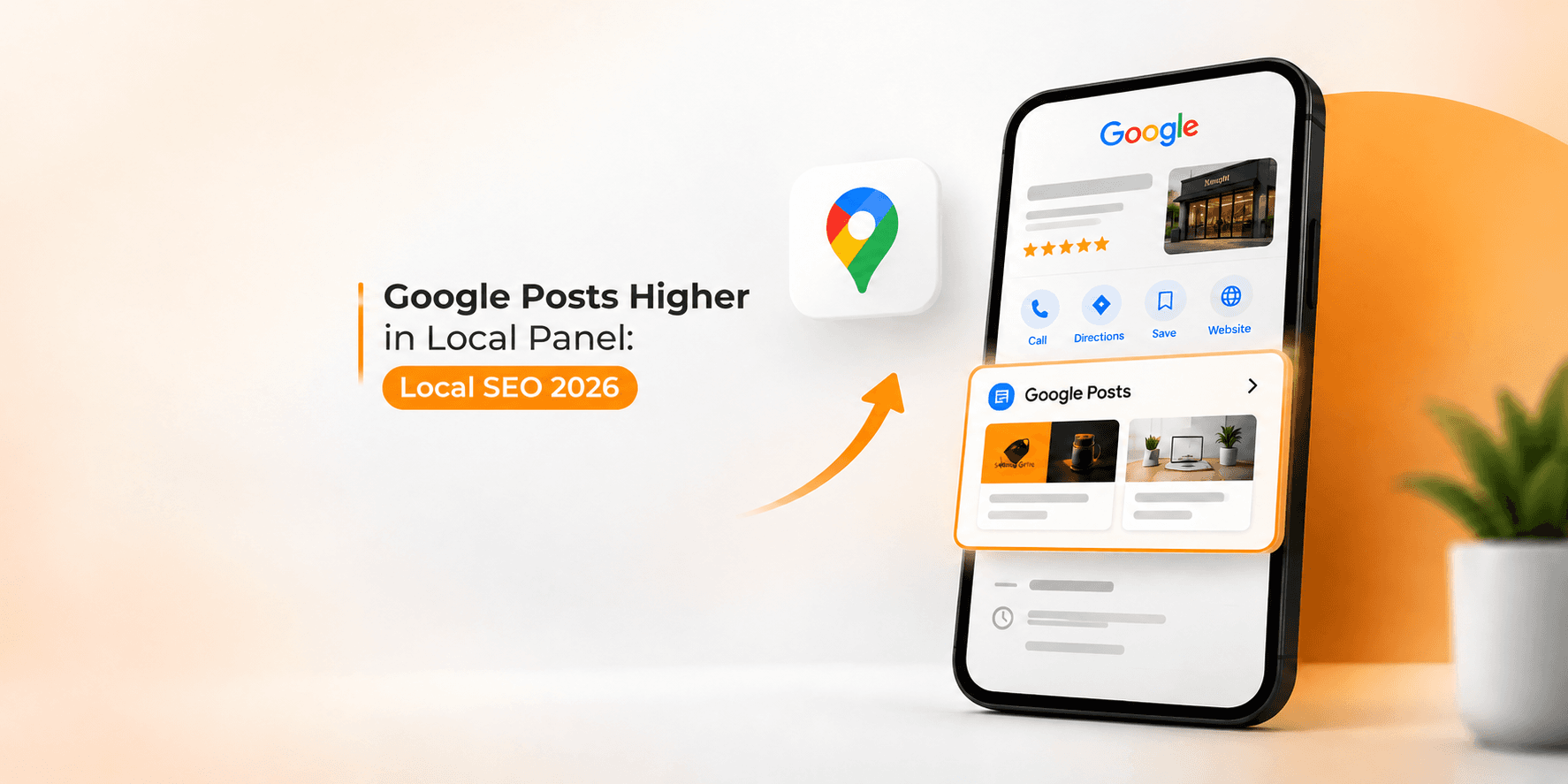
Google is testing a change that could make Google Business Profile posts more visible in local search: moving the posts section higher in the business information panel. This may help customers notice offers, updates, and events sooner, but there is currently no confirmed evidence that the change directly improves local rankings, calls, or website clicks. The key opportunity for local businesses is to publish useful, timely posts and measure whether they help customers take action, rather than treating posting frequency as a shortcut to higher Google Maps positions.
What Is Changing in the Google Local Panel?
In October 2026, reports described Google testing a higher position for Google Posts in the local business panel shown in Search. The observation was shared by Google Business Profile specialist Ben Fisher and reported by Search Engine Roundtable. The section appeared higher in some views, but its position was not consistent across observations.
This appears to be an interface test, not a confirmed permanent rollout. Google has not publicly explained why it is testing the change, how many businesses are included, or whether every user will see the same layout.
The distinction matters. A business might gain more visibility inside its profile without moving up in the Local Pack or Google Maps results. A layout change can affect what customers notice after finding a business, even when its search ranking stays the same.
What Are Google Posts?
Google Posts, often labelled Updates in Google Business Profile, let eligible businesses share information directly on their profiles. They can help customers understand what the business offers right now, without needing to visit another website first.
Common post types include:
Updates: Announcements, new services, business news, or useful customer information.
Offers: Promotions with relevant details, terms, dates, or a link to redeem the offer.
Events: Workshops, open days, launches, and other activities with dates and times.
For example, a dental clinic could announce new appointment availability, a restaurant could highlight a seasonal menu, and a car workshop could promote a pre-winter inspection. The best post gives customers a clear reason to act and makes the next step easy.
Posts should not simply repeat the business name and list keywords. They should communicate something specific, current, and useful.
How Could Higher Google Posts Placement Affect Local SEO?
1. More visibility inside the business profile
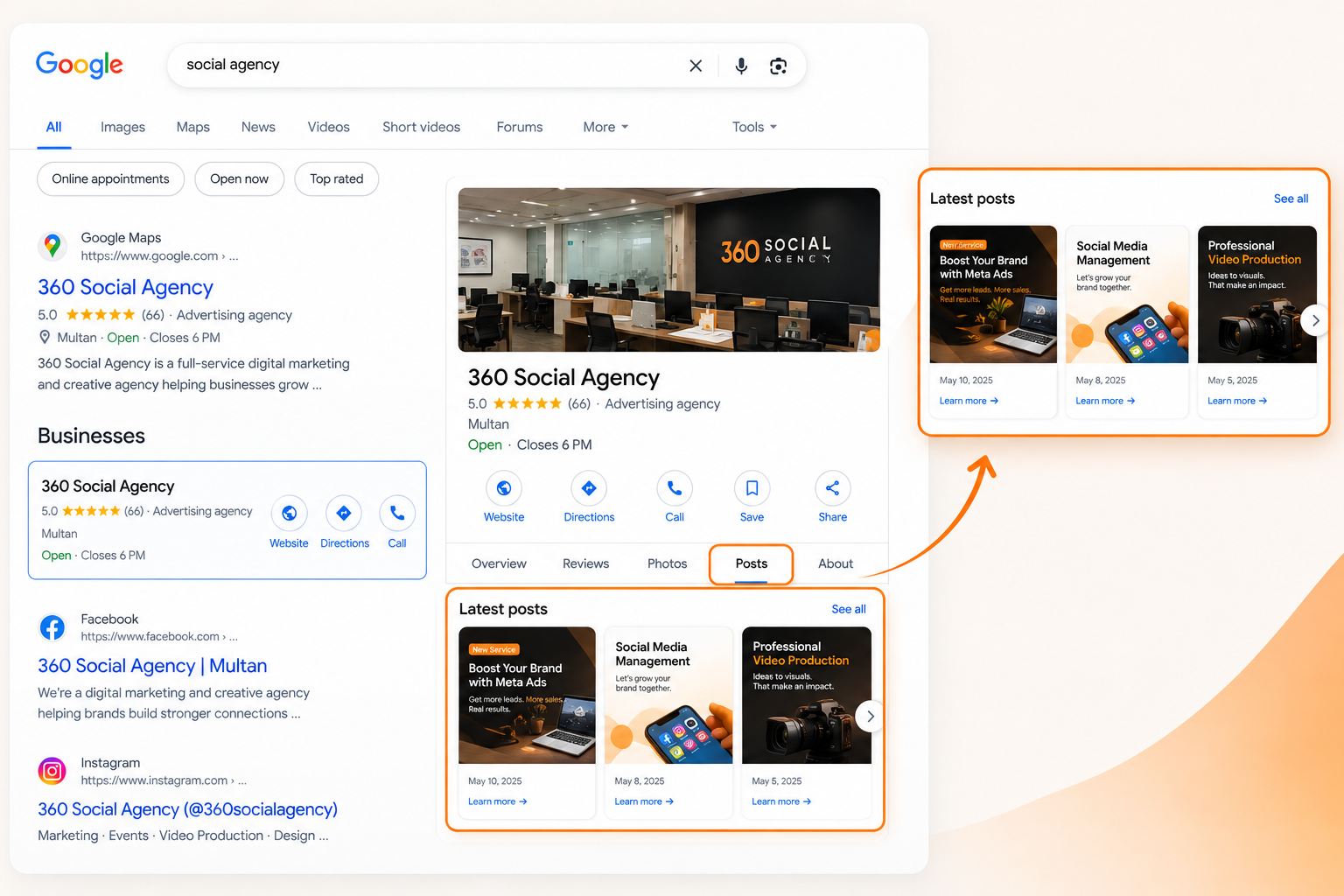
If posts appear closer to the top of a local panel, customers may find them with less scrolling. That could give a timely offer or service update a better chance of being noticed.
However, greater exposure is only an opportunity, not a guaranteed result. Users may still focus on reviews, opening hours, directions, photos, or contact details. The effect will depend on the search, the device, the layout, and the relevance of the post.
2. Better support for customer decisions
Local search often happens when someone is comparing businesses or preparing to contact one. A useful post can answer a question that influences that decision.
For example, a salon post about a seasonal treatment can explain what is included and how to book. A local service provider can share a new service area or describe a recently added service. A clear call to action gives interested customers a direct next step.
3. No confirmed direct ranking boost
Google says local search results are mainly shaped by relevance, distance, and prominence. Its official guidance recommends complete business information, accurate details, reviews, and photos. It does not identify the higher placement of posts as a local ranking factor.
Google Business Profile Help
Therefore, businesses should not assume that posting more often will move them higher in Google Maps. Posts can support visibility and conversions, but they do not replace a well-maintained Business Profile, authentic reviews, a useful website, and a sound local SEO strategy.
For a broader plan, read our guide on how to rank your website on Google in Pakistan.
What Should Local Businesses Do Now?
You do not need to rebuild your marketing strategy because of an unconfirmed interface test. Instead, use this as an opportunity to improve the quality and measurement of your existing Google Business Profile activity.
1. Check your own profile
Search for your business name on desktop and mobile. Note where the posts section appears in relation to reviews, opening hours, photos, and other details. Check again on different days, because the interface may vary.
Avoid assuming that your customers see exactly the same panel you do. Search results can differ by device, location, query, and other contextual factors.
2. Publish posts with a clear purpose
Before writing a post, decide what you want the customer to do. That might be to call, visit a service page, book an appointment, or learn about an offer.
A simple structure works well:
Lead with the most important information.
Explain the customer benefit in plain language.
Add a relevant photo or video where appropriate.
Use one clear call to action.
Include a link when it helps the customer take the next step.
Avoid vague messages such as “Best services available” or “Contact us today” without explaining what makes the offer relevant.
3. Keep your profile accurate
Posts cannot compensate for incorrect business hours, missing services, the wrong category, or outdated contact details. Make sure your core profile information is complete and consistent with your website.
Google’s official local ranking guidance is a useful starting point for checking these fundamentals.
4. Connect posts to your website
When a post links to a service page, booking page, or helpful article, use a relevant destination rather than sending every visitor to the homepage.
You can also add UTM parameters to supported website links so that traffic from a specific campaign can be identified in Google Analytics. This helps you compare which posts send visitors to your website, although not every call or in-person visit will be attributable to a post.
If your business needs help with its wider local visibility, explore our SEO and Google ranking services.
How to Measure Whether Google Posts Are Working
A higher position in the panel may look encouraging, but appearance alone does not prove business impact. Track useful outcomes over time instead of measuring success by how often you publish.
What to measure | What it helps you understand |
Business Profile interactions | Whether customers are engaging with your profile |
Website clicks with UTM tracking | Whether posts send visitors to your website |
Calls and booking enquiries | Whether customer interest turns into leads |
Form submissions or purchases | Whether activity contributes to business results |
Post placement across devices | Whether you can observe the interface change |
Record a baseline before making major changes to your posting routine. Then compare results across similar periods and account for seasonality, promotions, and changes in demand. If calls increase, for example, do not automatically credit the post placement. Other marketing activity or a seasonal increase in demand may explain the change.
Also, separate visibility metrics from conversion metrics. A post can receive attention without generating leads, while a post with fewer interactions may attract customers who are ready to book.
Common Mistakes to Avoid
Local businesses can waste time on Google Posts when they focus on activity instead of usefulness. Avoid these common mistakes:
Posting only for rankings: There is no confirmed evidence that frequent posting alone improves local rankings.
Repeating the same offer: Repetitive updates give customers little new information. Share meaningful changes instead.
Using unclear calls to action: Tell customers whether they should call, book, visit, or read more.
Ignoring the rest of the profile: Accurate categories, services, contact details, reviews, and photos remain important.
Expecting instant results: One post or one change in panel layout cannot establish a reliable performance trend.
Treating a test as a permanent update: Google may change or withdraw interface experiments.
A practical local SEO strategy should combine an accurate Business Profile, useful website content, a strong review process, and measurement. Our Google Business Profile and AI visibility guide also explores why businesses should pay attention to how their information appears across search experiences.
Final Thoughts
Google's reported test of a higher Google Posts position could give local businesses another opportunity to put timely offers and updates in front of customers. But it is too early to claim that the change improves rankings or generates more leads.
The practical approach is simple: keep your profile accurate, publish posts that help customers make decisions, link to relevant pages, and measure meaningful outcomes. If Google keeps the section higher, well-prepared businesses may benefit from the extra exposure. If the layout changes again, the same useful content can still support customer trust and conversions.
Frequently asked questions
Reports in October 2026 described Google testing a higher placement for Google Posts in some local business panels. The layout has not been confirmed as a permanent change for all businesses and users.
Google's published local ranking guidance highlights relevance, distance, and prominence. It does not confirm that publishing posts or their position in the panel directly improves rankings. Posts are best used to communicate useful updates and encourage customer action.
There is no universal posting frequency that guarantees better rankings. Publish when you have something useful to share, such as a genuine offer, a new service, an event, or an important update. Consistency is helpful when it supports quality rather than creating repetitive content.
A strong post should have a clear message, a relevant customer benefit, accurate details, and one appropriate call to action. Add a useful image and a relevant website link when they help customers understand or act on the information.
Use available Business Profile performance data, tagged website links, Google Analytics, and business outcomes such as calls, enquiries, bookings, or purchases. Compare results over time and avoid attributing every change to the position of the posts section.
Want us to do this for you?
Get a free, no-pressure audit of your ads, funnel, and website.
Get my free audit