Google Ads Automated Promotions 2026: What Advertisers Need to Know
Google Ads is making another change to how businesses promote their offers. Starting October 12, 2026, Google is set to automatically identify eligible deals from advertisers' websites and display them in qualifying Search and Performance Max campaigns.
The feature, called Google Ads automated promotions, can reduce the need to create promotion assets manually. But it also means that offers published on your website may appear in your advertising without someone on your team creating each promotion.
For businesses running seasonal discounts, local offers, or limited-time deals, this is worth reviewing.
The important question isn't simply whether Google can automate your promotions. It's whether the offers Google finds are accurate, profitable, and appropriate for your customers.
What Are Google Ads Automated Promotions?
Google Ads automated promotions are account-level automated assets that identify eligible promotional offers on an advertiser's website and attach them to qualifying Google Ads campaigns.
Instead of manually creating an asset for every discount, Google's system can recognize an existing offer on a landing page and use it to highlight the promotion in an ad.
For example, imagine a clothing retailer advertising a winter collection. Its website displays a promotion offering 20% off selected jackets. If the retailer's campaign meets the eligibility requirements, Google may extract that discount and display it as a promotion alongside the relevant advertisement.
The purpose is straightforward: make existing offers more visible to potential customers without requiring additional setup for every promotion.
According to Google's official automated promotions documentation, the feature is intended to support both online conversions and visits to physical business locations.
However, automated promotions do not apply to every Google Ads campaign. Eligibility depends on the campaign type, attached location assets, and whether manual promotion assets are already running.
Changes To Google Ads Automated Promotions October 2026?
Google is rolling automation into its advertising platform at every turn, from targeting campaigns, optimizing them, to even showing them to prospective customers.
Automated promotions extend that approach to the offers businesses publish on their websites.
According to an advertiser notification reported by Search Engine Roundtable on October 5, 2026, Google planned to begin automatically applying eligible website promotions on October 12, 2026.
The update is particularly relevant because the setting is designed to operate automatically for applicable accounts unless advertisers disable it.
Previously, an advertiser wanting to highlight a particular offer would typically create a promotion asset manually. With automated promotions, Google can identify a suitable offer from an eligible landing page and attach it without the advertiser performing that individual step.
This does not mean Google is automatically changing product prices, editing website discounts, or rewriting the entire advertisement. It's about being able to recognize when promotions are offered and showing them up as advertising property.
The October 12 date is a reported rollout milestone, not confirmation that every advertiser has received the feature simultaneously. Businesses should check their own account settings and campaign eligibility.
How Do Google Ads Automated Promotions Work?
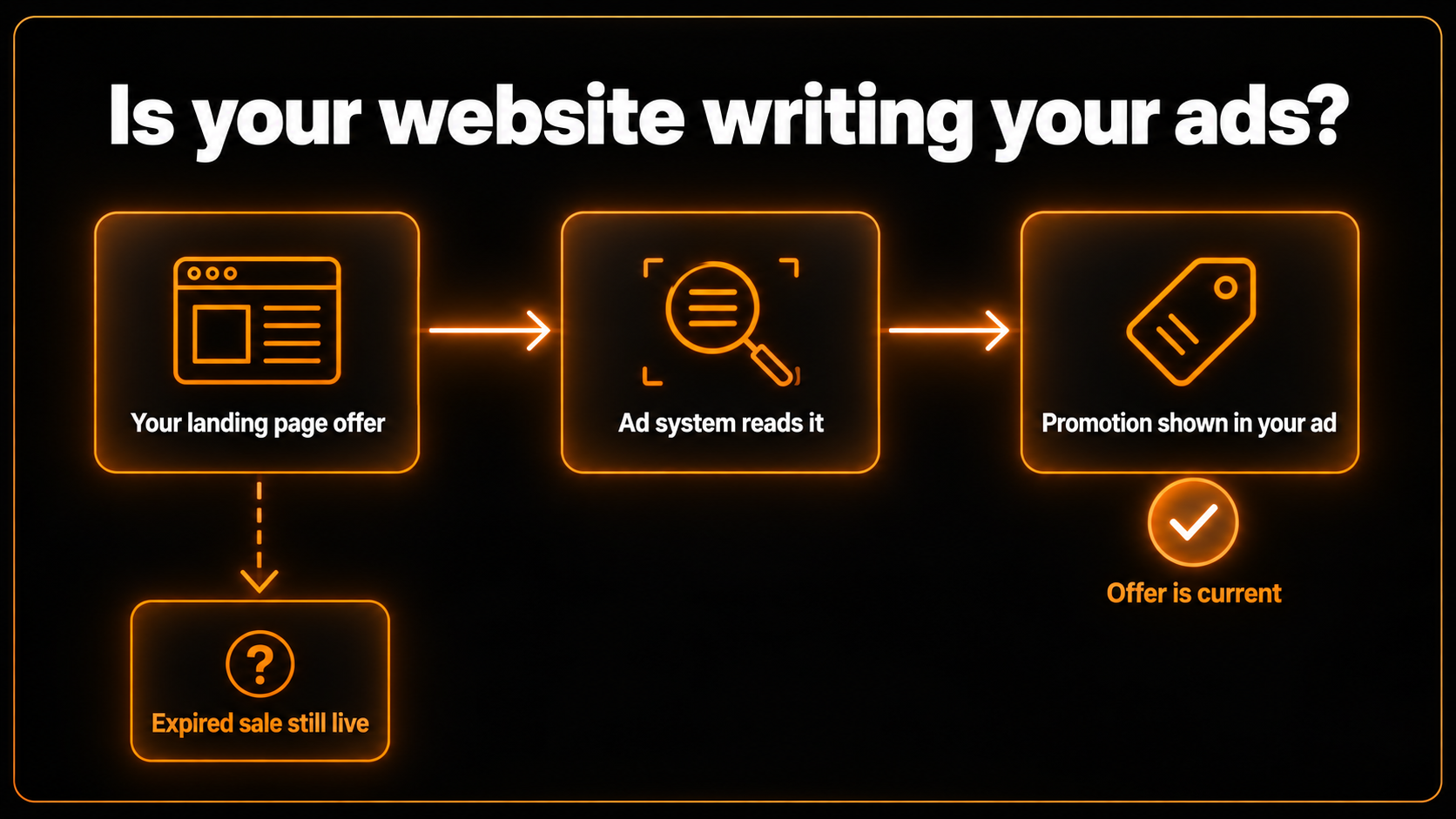
The process begins with the promotional information already available on your website.
Google analyzes eligible landing pages to identify deals that may be relevant to a user's search. If the system finds a suitable promotion and the associated campaign meets its requirements, it can attach that offer as an automated promotion asset.
Consider a local electronics store advertising laptops through Google Search.
The store's website includes a clearly stated offer: "Save $100 on selected laptops until October 20."
When Google identifies this promotion, it may use the discount in an eligible advertisement. The person looking for a laptop would then be able to read the offer before getting on the site.
This creates another opportunity for a business to communicate value, particularly when customers are comparing similar products.
How Google verifies promotional offers
Google says its system uses verification to help ensure that promoted offers remain available.
Under the current documentation, each automated promotion is eligible to serve for less than 24 hours. After that period, Google may re-enable it if the system can verify that the offer remains visibly available on the advertiser's website.
That detail is important. It describes an individual promotion's serving eligibility, not a guaranteed schedule for crawling every website or removing every outdated offer.
For advertisers, the practical responsibility remains the same: keep website promotions accurate and remove offers when they expire.
A promotion that is technically visible on a website is not necessarily one that a business still intends to honor.
Which Google Ads Campaigns Are Eligible?
Not every advertiser needs to change their account immediately.
Google's documented eligibility requirements focus on two campaign types: Search and Performance Max.
An eligible campaign must also have location assets attached and must not already have a manual promotion running.
Campaign or condition | Automated promotion eligibility |
Search campaign with location assets | Eligible if other requirements are satisfied |
Performance Max with location assets | Eligible if other requirements are satisfied |
Campaign without location assets | Not eligible under current requirements |
Campaign with a running manual promotion | Automated promotion is bypassed |
Display-only or Video-only campaign | Not independently listed as eligible |
Campaigns must also comply with Google's advertising policies.
Location assets are particularly relevant for businesses that connect their advertising with physical locations, such as retailers, restaurants, clinics, and local service providers.
For example, a dental clinic running Google Search ads with attached location assets might qualify if it advertises an eligible promotional offer on its website and has no manual promotion running in that campaign.
By contrast, an online-only business running Search ads without location assets would not meet the current requirements.
This distinction matters because businesses can waste time troubleshooting a feature that their campaign configuration does not support.
Benefits of Google Ads Automated Promotions for Businesses
Automated promotions can be useful, particularly for businesses that frequently update their offers or manage several advertising campaigns.
However, the benefits depend on the accuracy of the website information and whether the selected promotions support the advertiser's commercial goals.
Less manual work for advertisers
Creating and maintaining promotion assets takes time. A business running multiple campaigns might have weekly discounts, special product offers, seasonal promotions, and local deals.
When Google identifies eligible promotions directly from landing pages, advertisers may spend less time setting up each offer.
This can be useful for smaller marketing teams that do not have dedicated staff monitoring every promotion.
The time-saving benefit is real in principle, but automation should not replace periodic reviews.
Better visibility for existing offers
A useful discount does not always receive enough attention in standard advertising copy.
Automated promotions give Google another way to surface existing offers to potential customers.
For someone comparing similar products or services, a relevant discount may make an advertisement more appealing.
That does not guarantee more sales. An offer still needs to be competitive, relevant, and supported by a landing page that makes purchasing straightforward.
Support for online and in-store conversions
Automated promotions are especially relevant to advertisers using location assets.
A business can potentially highlight an offer to people who are searching for products or services near a physical location.
A local retailer promoting a storewide sale, for example, may benefit when nearby customers discover the discount through Search.
Whether that visibility generates profitable results depends on customer intent, offer quality, competition, and the overall campaign.
For businesses looking to improve those factors together, a structured performance marketing strategy can help connect campaign messaging with conversion tracking and business goals.
What Are the Risks of Automated Promotions?
The biggest concern with automated promotions is not that automation itself is unreliable. It is that an advertising system may identify an offer without fully understanding the business conditions surrounding it.
A promotion can look attractive on a webpage but still be inappropriate to advertise broadly.
Outdated offers can create customer confusion
Imagine a furniture store that ran a 25% discount during a previous holiday sale. The sale ended, but the promotional banner remains on an old landing page.
If that page is associated with an eligible campaign, outdated information could become a potential source of confusion.
Google's verification process is intended to reduce this risk, but advertisers should not assume it eliminates every possibility of incorrect or outdated messaging.
Customers who see an advertised discount generally expect to receive that discount when they visit the website or store.
When their expectations are not met, businesses can face complaints, abandoned purchases, and reduced trust.
Promotion terms may be misunderstood
Not all discounts apply equally to every customer.
A website might advertise "15% off for first-time customers" or "Free delivery on orders over $75."
Those conditions affect the actual value of the offer.
Businesses should ensure that promotional terms, restrictions, qualifying products, minimum order amounts, and expiration dates are clearly displayed.
An offer that looks simple in an advertisement should not become confusing when a customer reaches the checkout page.
Advertisers have less control over which offers appear
Some businesses deliberately choose when and where a discount should be advertised.
A premium retailer may want to promote a sale only during a specific campaign. Another business may have different promotions for different locations or customer groups.
Automatic extraction can make that level of promotional control more complicated.
Google recommends manually creating promotion assets when advertisers need precise control over promotional messaging or dates.
The trade-off is therefore between convenience and control. Neither approach is automatically better for every business.
How to Audit Your Website Before Using Automated Promotions
Before deciding whether to keep the feature enabled, review the pages connected to your eligible campaigns.
This is particularly important for websites managed by several teams. A marketing manager may control the Google Ads account while a web developer or store administrator updates promotional banners.
A simple audit can prevent those teams from working with different information.
Step 1: Identify the landing pages used in eligible campaigns
Open your Google Ads account and review active Search and Performance Max campaigns.
Check which campaigns have location assets attached and whether they already use manual promotion assets.
Then identify the landing pages those campaigns use.
Rather than auditing every page on a large website, prioritize pages connected with eligible campaigns and currently running offers.
Step 2: Check promotional wording and expiration dates
Review each landing page as if you were a customer seeing it for the first time.
A phrase such as "Limited-Time Discount" may sound attractive, but it provides little clarity unless the conditions are explained.
Look for expired sale banners, outdated coupon codes, promotional prices that do not match checkout totals, and missing eligibility conditions.
Where practical, state when the offer begins, when it ends, which products qualify, and whether any restrictions apply.
Step 3: Test the offer before trusting it
A visible promotion does not necessarily mean that the discount works.
If a customer is promised 20% off, test the relevant product or checkout process to confirm the offer can be redeemed.
For service-based businesses, check that the advertised price or promotional package is still available through the booking or inquiry process.
This is especially important for businesses that change prices frequently.
Step 4: Assign responsibility for maintaining offers
Someone on the business team should be responsible for publishing, updating, and removing promotions.
The person managing Google Ads should also know when important website offers change.
Without that coordination, even a well-configured automated system can surface confusing information.
A useful internal process is to maintain a shared promotion calendar showing the offer, landing page, start date, end date, and responsible team member.
Step 5: Review automated assets after enabling the feature
Once the feature is active, check which promotional assets Google has created.
Confirm that the wording matches the website and that each displayed offer is still appropriate.
Do not evaluate the feature based only on whether it produced impressions or clicks. Look at the broader impact on qualified leads, conversions, purchase value, and profitability.
A campaign attracting additional clicks but failing to generate worthwhile business results does not automatically represent an improvement.
How to Turn Off Google Ads Automated Promotions
Advertisers who require direct control over their promotional messaging can disable automated promotions from the account-level automated asset settings.
Google documents the following process:
Sign in to your Google Ads account.
Open Assets from the Campaigns menu.
Select the three-dot More menu in the filter bar.
Choose Account level automated assets.
Open the three-dot menu on that page and select Advanced settings.
Find the Automated promotions dropdown.
Select Off and provide a reason if prompted.
The same settings area allows advertisers to turn the feature back on by selecting On (recommended).
These steps follow the official Google Ads Help instructions. Interface labels and navigation may change as Google updates the platform.
Disabling the feature can make sense when promotions require strict approval, prices change frequently, or the website contains offers with complex restrictions.
For businesses with well-maintained promotional pages and no special restrictions, leaving the feature enabled may be worth testing.
The important decision is whether the automation supports the business's needs, not simply whether Google recommends it.
How to Find Promotions Automatically Created by Google
Enabling automation without reviewing the results leaves an important gap in campaign management.
Google provides a way to identify promotional assets created by its system.
Open the Assets section in Google Ads, filter the Asset type to Promotion, and look at the Added by column.
Automatically sourced promotions are identified as Google AI.
Google also explains that advertisers can hover over the Google AI label to inspect additional sourcing information and hover over the promotion name for more asset details.
These details help distinguish promotions created manually by a marketing team from those identified automatically.
Make asset reviews part of your regular campaign maintenance, particularly after updating website discounts or launching seasonal offers.
Google also recommends segmenting campaign reports by click type and examining overall campaign performance rather than judging automated promotions only by direct interactions with the promotion itself.
Automated Promotions vs. Manual Promotion Assets: Which Is Better?
Automated and manual promotion assets can serve the same broad purpose, but they offer different levels of control.
Feature | Automated promotions | Manual promotion assets |
Offer sourcing | Google identifies website offers | Advertiser supplies promotion details |
Setup | Automated for eligible campaigns | Requires advertiser setup |
Wording control | Depends on automated extraction | Greater advertiser control |
Promotion dates | Based on current automated verification process | Can be specified manually |
Best suited for | Straightforward, well-maintained offers | Offers requiring precise messaging or timing |
If your business regularly publishes clear, accurate discounts, automated promotions may reduce administrative work.
If you operate in a sector where pricing, eligibility, or promotional wording requires additional approval, manual promotion assets are usually the more controlled option.
There is also a practical middle ground: businesses can use automation where it is suitable while maintaining manual promotions on campaigns requiring exact messaging.
Under Google's current rules, campaigns with existing manual promotions running are bypassed by the automated promotion system.
Are Automated Promotions the Same as Automated Discounts?
No. These are different Google advertising features.
Automated promotions identify existing promotional offers and display them through eligible advertising assets.
Automated discounts, associated with Google's Merchant Center capabilities, concern the optimization of product discount prices through an automated system.
For example, promoting an existing 15% discount is different from allowing an automated pricing system to determine a discount.
That distinction matters for online retailers because the two features involve different levels of control over the offer itself.
Automated promotions do not mean Google independently changes the prices displayed on your website.
Should Businesses Enable or Disable Automated Promotions?
There is no universal answer.
A local clothing retailer with straightforward discounts and regularly updated landing pages might benefit from allowing Google to highlight its promotions.
A business offering highly customized service packages may prefer to retain manual control because the final price or offer conditions vary between customers.
Before making a decision, consider the following:
Are promotional offers updated consistently across the website?
Do the campaigns actually meet Google's eligibility requirements?
Are discount terms easy for customers to understand?
Can the business honor every offer it publishes?
Does someone regularly review Google Ads assets and conversion performance?
If the answer to most of these questions is yes, testing automated promotions may be reasonable.
If the website contains outdated information, unclear promotional conditions, or frequent pricing changes, correcting those issues should come first.
For advertisers operating across several locations, it is also worth confirming that the promoted offer is available at the locations customers may associate with the advertisement.
The broader lesson is that effective automation depends on reliable business information.
What This Update Means for the Future of Google Ads
Google Ads has steadily moved toward automating more campaign activities, from bidding and targeting to asset creation and campaign optimization.
Automated promotions reflect the same direction: businesses provide the underlying information, while Google's systems handle more of how that information appears in advertisements.
For advertisers, this changes the importance of website maintenance.
A landing page is no longer only the destination someone visits after clicking an ad. Its content can also influence the promotional information that appears before the click.
That makes coordination between website management, paid advertising, and conversion optimization increasingly important.
Businesses that keep their offers accurate and monitor performance should be better positioned to evaluate these tools responsibly.
Those that rely on outdated promotional pages or rarely review their campaigns may find that automation makes existing weaknesses more visible.
The goal should not be to automate everything. It should be to automate the activities that can be performed reliably while keeping important business decisions under appropriate human control.
Frequently Asked Questions
What are Google Ads automated promotions?
Google Ads automated promotions are account-level automated assets that identify eligible offers from website landing pages and attach them to qualifying Search and Performance Max campaigns. They help advertisers highlight existing deals without manually creating every promotion asset.
When do Google Ads automated promotions start in 2026?
Google notified some advertisers that automatic application would begin on October 12, 2026. This was reported by Search Engine Roundtable on October 5. Actual eligibility and availability should be checked within the advertiser's Google Ads account.
Can I turn off automated promotions in Google Ads?
Yes. Open Assets, navigate to Account level automated assets, select Advanced settings, and change Automated promotions to Off. Google may ask for a reason.
Do automated promotions apply to all Google Ads campaigns?
No. Current eligibility covers active Search and Performance Max campaigns with attached location assets, including applicable local ad campaigns. Campaigns already running manual promotion assets are bypassed.
Can Google show an expired promotional offer?
Google uses verification designed to identify active offers, but businesses should not rely on automation alone. An outdated offer remaining on a landing page can create potential confusion, so advertisers should remove expired promotions promptly.
Do Google Ads automated promotions improve conversions?
They may help make relevant offers more visible, but higher conversion rates or profitability are not guaranteed. Results depend on the offer, campaign targeting, landing page experience, customer intent, and how effectively the business measures outcomes.
Final Thoughts
Google Ads automated promotions offer advertisers a convenient way to make existing discounts more visible without creating every promotion asset manually.
For businesses with accurate landing pages and clearly defined offers, this can reduce some of the routine work involved in managing campaigns.
But the update also introduces a responsibility that is easy to overlook: information published on your website can influence what customers see in your advertisements.
Before leaving the feature enabled, review campaign eligibility, verify active offers, inspect the promotions Google creates, and consider whether manual control would be more appropriate.
At 360 Social Agency, we help businesses connect advertising strategy, landing page performance, and conversion tracking so campaign decisions are based on business results rather than automation alone.
If you're unsure how this update affects your campaigns, explore our Google Ads and performance marketing services or book a strategy call to discuss your advertising setup.
Frequently asked questions
Google Ads automated promotions are account-level automated assets that identify eligible offers from website landing pages and attach them to qualifying Search and Performance Max campaigns. They help advertisers highlight existing deals without manually creating every promotion asset.
Google notified some advertisers that automatic application would begin on October 12, 2026. This was reported by Search Engine Roundtable on October 5. Actual eligibility and availability should be checked within the advertiser's Google Ads account.
Yes. Open Assets, navigate to Account level automated assets, select Advanced settings, and change Automated promotions to Off. Google may ask for a reason.
No. Current eligibility covers active Search and Performance Max campaigns with attached location assets, including applicable local ad campaigns. Campaigns already running manual promotion assets are bypassed.
Google uses verification designed to identify active offers, but businesses should not rely on automation alone. An outdated offer remaining on a landing page can create potential confusion, so advertisers should remove expired promotions promptly.
Want us to do this for you?
Get a free, no-pressure audit of your ads, funnel, and website.
Get my free audit